
I upgraded my OpenClaw system that runs my AI agents and spent the next 48 hours trying to recover it. The upgrade appeared to work, but then I noticed that my agents were taking forever to respond, and I went down a rabbit hole trying to fix it.
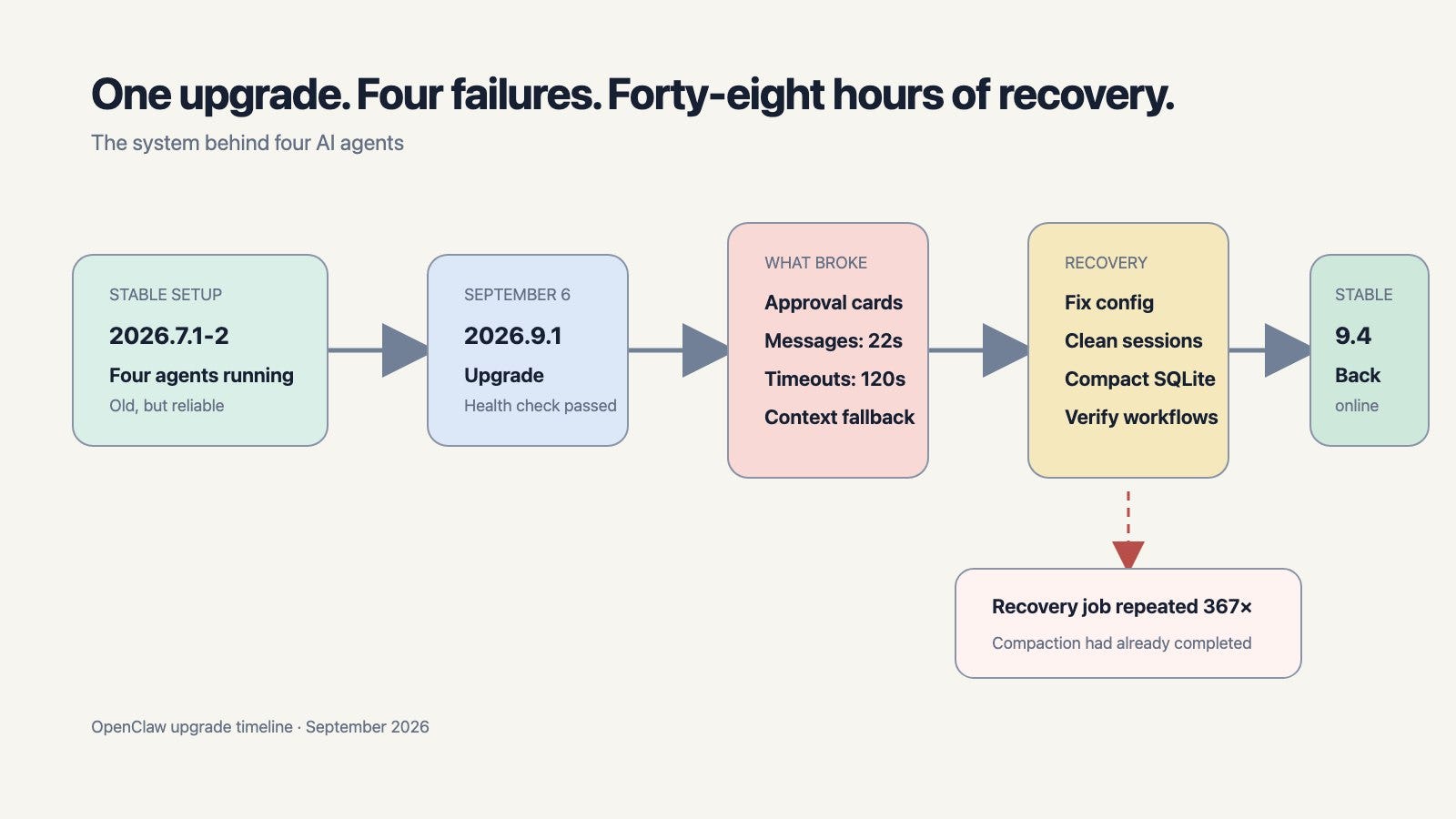
Two weeks ago, I upgraded the system running my AI agents and then spent the next 48 hours trying to recover it. After the upgrade, my approval cards disappeared, messages slowed down, and I could no longer depend on the agents to complete work or even reply consistently.
To be honest, I like software updates too much. I have always been an early adopter of software updates. I want to try the new models, use the new features, and explore how the latest release makes my setup better. Now, this is an acceptable risk if you are upgrading an app on iOS, or even installing a new iOS version. However, I should have exercised additional due diligence before upgrading a production system that four AI agents depend on every day.
I have been using OpenClaw as the primary system behind my AI agents for more than six months. My agents help me with investing, personal projects, and the routine work that I would otherwise forget. By early September, the system was running on OpenClaw 2026.7.1-2. It was old, but it worked.
For the next two days, I had four agents that appeared to be online, but I could not trust them to finish a turn. Every missing reply sent me back into the logs to figure out which part had failed.
What happened after the upgrade
On September 6, I upgraded to OpenClaw 2026.9.1. The installation completed, the Gateway came back up, and the basic health checks passed. However, the workflows I used every day became unreliable.
The first problem was approval cards. My agents sometimes need my approval before they run a command or change a configuration. Those cards stopped appearing in my direct Telegram conversation, which meant I had to find the request and approve it manually from the command line. The cause was a Telegram setting that allowed interactive buttons in group topics, but not in direct messages. The new release routed the approval back to the conversation where it started and exposed a gap that had already existed in my configuration.
The second problem was speed. One test Telegram message took 22 seconds to arrive. Eight agent turns waited for two minutes and then timed out during the heaviest period. When I checked the Gateway logs, I found 228 slow database opens and 105 slow SQLite transaction holds across two days.
Why had the database become so slow? My main agent database had grown to about 1 GB, and Peter’s database had grown to about 2 GB. These files contained more than session history because they also held the memory index. However, I had allowed old sessions to accumulate, especially sessions created by subagents and scheduled jobs.
The database size became visible when several agents and scheduled jobs were working at the same time. Their database operations had to wait behind slow transaction holds, messages queued up, and some crossed the two-minute timeout.
The third problem was the context engine. After the upgrade, it was not registered correctly, so almost every agent turn fell back to the legacy context path. That added more overhead and produced two 30-second active-memory timeouts. The database was the main cause of the severe delays, and this made them worse.
The recovery became another problem
My first recovery attempt made this harder to diagnose. I had built a recovery script with the help of an agent. The script automated to restart the gateway and clean the databases but the script ran into several issues with the databases still locked, and the cleanup had not happened.
Finally, I had to manually fix the approval setting, restore the context engine, and create a verified backup before cleaning the sessions. I had to delete several old sessions manually.
Now here is the part I did not expect. Deleting old sessions did not reduce Peter’s SQLite file below roughly 1.05 GB because SQLite had not reclaimed the deleted pages. I needed to compact it offline.
The compaction completed successfully the first time. However, the one-shot macOS recovery job had a bug that that it included a loop in one condition. This bug triggered the entire maintenance procedure again, stopped the Gateway, and repeated that cycle several times before I had to manually stop it. Once I disabled that loop, the Gateway started normally, Telegram resumed, the scheduled jobs caught up, and the agents returned to their regular work.
As part of this recovery, I also upgraded to 2026.09.04 as this release fixed one of the key bugs that I was running into.
What I learned
First, a running Gateway is only one health check. I need to test the end-to-end workflows that cross system boundaries: a message entering from Telegram, a reply coming back, an approval card appearing, a scheduled job running, and a memory lookup completing.
Second, session retention and database compaction are separate operations. Retention removes old rows. Compaction reclaims the pages they occupied. I now keep only recent and active sessions, protect current Telegram and scheduled-job sessions, and watch the database size and slow-transaction warnings.
Third, a timeout gives me an unknown result. Both cleanup commands actually completed even though the client timed out. Retrying them immediately could have repeated a destructive operation. Now I reconcile the live count and current service state before I retry anything.
Finally, I will keep the recovery path simpler than the maintenance job. A recovery script must run once, verify what happened, and stop. It should never be able to restart an entire maintenance procedure indefinitely.
What I recommend checking before an upgrade
OpenClaw 2026.9.5, released after this incident, now validates an update against a private copy of the setup before switching versions. This reduces the risk, but the OpenClaw documentation still recommends a verified backup because restoring an older application version cannot undo every database migration.
If you are upgrading a system you already depend on, this is the checklist I recommend:
Read the release notes for every version you are skipping, including changes to plugins, channels, configuration, and the database schema.
Run openclaw doctor and openclaw update --dry-run. Fix the current installation before changing versions.
Create a full backup with openclaw backup create --verify. Do not copy a live SQLite file and assume that it is a valid backup.
Check every agent database, retained-session count, and available disk space. Clean up stale sessions before the upgrade, then compact separately if you need to reclaim deleted pages.
Wait for active agent turns, subagents, and scheduled jobs to finish before starting the update.
After the restart, test one inbound message, one reply, one approval, one scheduled job, and one memory search.
If the update result is unclear, check openclaw update status --json and openclaw gateway status --deep --json before retrying.