
I have been using OpenClaw agent harness as my primary agent for the last six months. I have more than four agents running and managing several parts of my day-to-day life. To put it simply, OpenClaw is powerful because of the flexibility it offers to its users. At the same time, I have spent several hours doing maintenance and tweaking OpenClaw configurations such as reducing cold-start behavior, browser configuration, consistent output format, memory plugin setup etc. to get the exact setup and behavior for my agents.
My continuous learning (whether Cloud, or AI or now agents) has been through Tech Twitter. My learning on AI and AI agents have been influenced by builders like Claire Vo, Hiten Shah, Thariq, Shubam Sahoo, Peter Yang, Madhu Guru and several others. Now, to catch up on these social posts, still means opening both apps, finding the useful posts scrolling through the feeds, and deciding what is worth reading.
Let me be honest here - I hate mindlessly scrolling on my LinkedIn and X feeds.
Once I realized this was a task I would need to repeat every week, I wanted an agent to do it for me. My request was simple: scan my LinkedIn and X feeds, find posts about AI and agents that people I follow were sharing or commenting on, and give me the links to the original posts.
Recently, I got the opportunity to try out Grok Bot. So, naturally I got curious about how Grok Bot compares with OpenClaw. So, I gave OpenClaw and Grok Bot the same job.
I wanted both agents to scan my LinkedIn and X feeds and give me a summary.
Getting it to work with OpenClaw
OpenClaw gives me a lot of control over the model, the agent’s memory, the tools it can use, and how the overall system works. That is one of the main reasons I enjoy using it.
However, for this use case, I first needed to configure the browser so the agent could use my signed-in LinkedIn and X sessions. There have also been times when the agent could open the browser but could not navigate the feed properly. When that happens, I need to open the browser, figure out where it got stuck, and retry the task.
I can get it working, but I need to do a fair amount of setup and troubleshooting. This is fine when I want to build the agent and control exactly how it works. But for a weekly list of posts, I would rather spend my time reading the posts than troubleshooting browser navigation.
I also wanted to refine the results by talking to the agent. If the first list was too broad, I wanted to ask it to focus on agent analytics, real use cases, case studies, or specific learnings. Again, this meant several tweaking to get the whole thing working like the way I wanted. I must have spent more than 45 minutes to achieve this.
Finally, after several tweaking, I was able to get the feed working with OpenClaw. But, this meant manually setting up my X API, figuring our the browser configuration so my agent can successfully use browser. Some of the challenge I experienced is also because of the model I was using inherently. Again, these are details you need to know and understand the underlying model capabilities and then figure out how to get your agent to successfully browse the web through the browser. you need to know how to roll up the sleeves and get into details.
Getting it to work with Grok Bot
Grok Bot first told me that it did not have a LinkedIn read connector. So, it decided to open LinkedIn in the browser on its own cloud computer. LinkedIn was not signed in yet, and Grok Bot presented a secure sign-in form where I could enter my credentials. It also told me that it would not see my password.
I signed in once. The entire setup took five minutes and I had a working feed in the next 5 minutes!
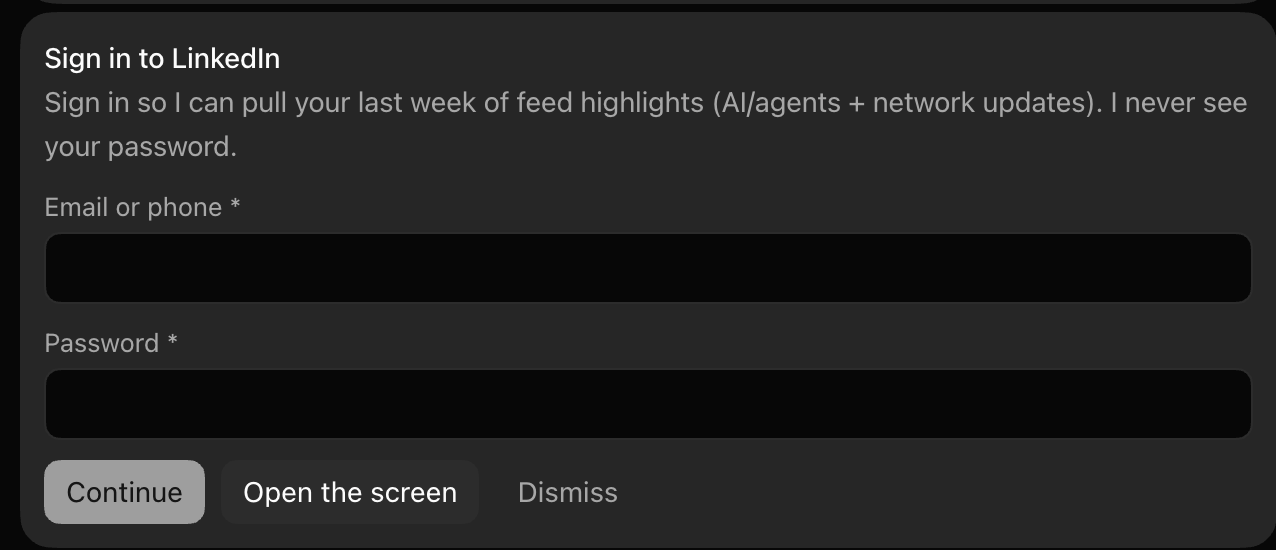

Grok Bot used its computer to seamlessly log in to my LinkedIn account and retrieved the feed I wanted in the next 5 minutes!
Now here is where things got interesting. After the initial login, I did not have to intervene again.
Oh by the way, getting Grok Bot to work with my Twitter (aka X) account was seamless as well because Grok Bot came with a connector for Twitter (aka X).
Grok Bot scanned both LinkedIn and X, found relevant posts, and returned links to the originals. The results were accurate. I asked it to refine the list a couple of times, and each iteration came back almost instantly.
The important under appreciated detail was that Grok Bot did not have a special LinkedIn connector either. However, Grok Bot comes with a managed computer (Linux) running in Cloud. Once I login, my authenticated LinkedIn and X sessions is therefore running on Grok Bot’s managed cloud computer. This allows us to continue through the website after I signed in.
With OpenClaw, I had to configure and troubleshoot that browser access myself.
Which one I would use
I believe the choice depends on what you want to do. If I want to choose the model, build custom tools, control exactly how memory works, or change how the agent behaves, I would still use OpenClaw. I enjoy rolling up my sleeves and building that system.
However, for this browser-heavy task, I would use Grok Bot again. The setup took less than five minutes, it completed both feeds, and it handled my follow-up requests without any intervention after the first login.
Now, I have tested only one task, so I am not ready to replace my OpenClaw agents. I have scheduled this feed scan every week and see whether Grok Bot keeps the sessions signed in, able to continuously return the right posts, and still needs no intervention.
If you new to AI agents and thinking about how to get started, I recommend you to try out Grok Bot.